- 3uTools is a completely free all-in-one tool for flashing and jailbreaking your iOS device. But sometimes you’re faced with the need to bypass Apple’s security-oriented iCloud Activation Lock.
- IPhone Activation iCloud Bypass Using 3utools 2020 ( Full Tutorial ),iPhone iCloud Unlock iPad/iPod/Apple Watch/ iPhone 4/4s/5/5c/5s/6/6s/6 plus/7/7 plus/8/8.
- Bypass Iphone Activation Without Sim
- Bypass Iphone Activation At&t
- How To Bypass Iphone Activation Lock With 3utools Download
- How To Bypass Iphone Activation Lock With 3utools Free
- How To Bypass Iphone Activation Lock With 3utools Free
iCloud Activation Lock is a great utility provided by Apple in its iOS devices that help to safeguard the owner’s private information discretely. Once the device gets lost or stolen, the owner can enable the Find My iPhone feature, which then sets a lock on the device. The only means to reactivate the device after this is to use the owner’s original Apple ID and password. Thus, you must know, how to Bypass iCloud Activation Lock.
The Activation Lock makes iPhones less attractive to thieves. When you set up an iPhone, it’s associated with your iCloud ID. Even if someone steals it, they can’t set it up and use it unless you remove the Activation Lock.
Though it seems that this works for the best always, there are certain hindrances. It may happen so, that you buy a second-hand device, that was probably lost or stolen. Or you may find a device, and you want to return it to its owner. But, unfortunately, the Find My iPhone feature has already been enabled on it.
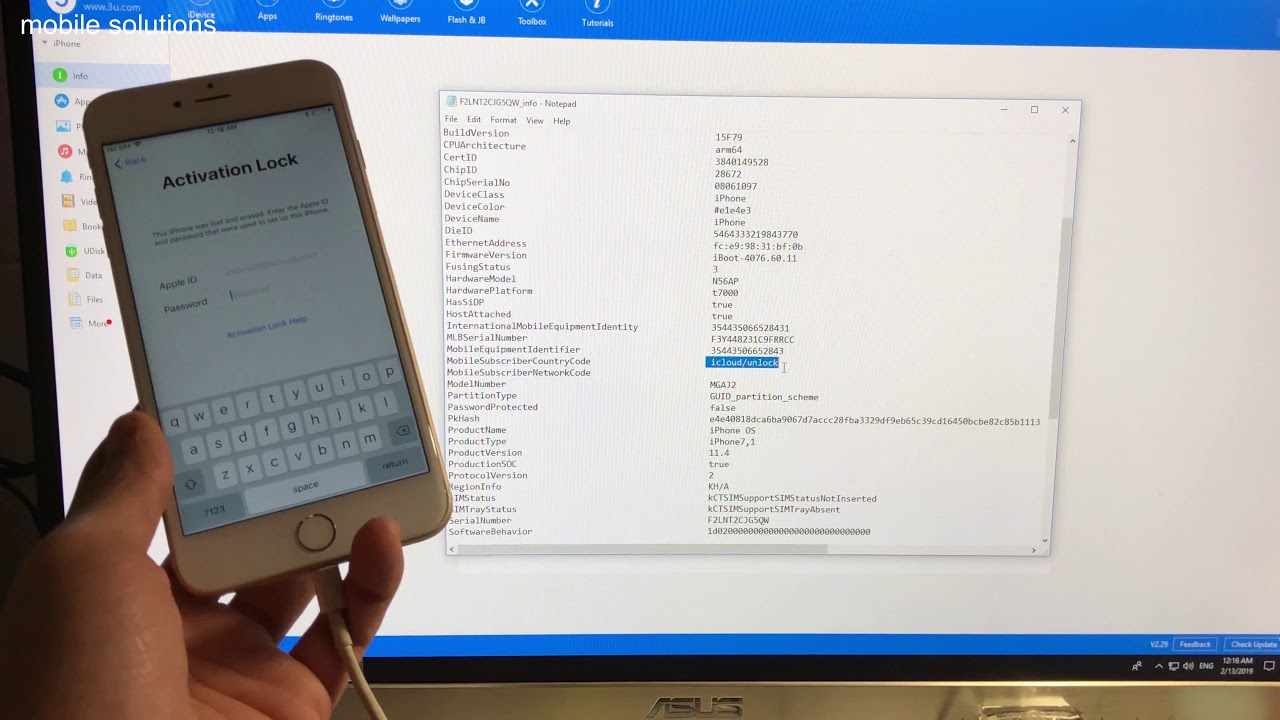
This means you need the original Apple ID and password to use the device. No worries.
Below are mentioned a few ways that can help you bypass the iCloud Activation Lock easily.
Contents
Quickest Way to bypass the iCloud Activation Lock
Note: This works for iOS 8 to iOS 9.2, or iOS 9.3.2, or iOS 9.4, iOS 10 on both iPhone and iPad.
Steps to Bypass iCloud Activation Lock:
- Reboot your iPhone, to set it up as a new device.
- The setup process kick starts.
- Tap on the “Home” button, and choose “Wi-Fi Settings.” List of all available Wi-Fi networks will be shown.
- Tap the “i” symbol close to the Wi-Fi network you want to attach to.
- The Wi-Fi settings menu will be shown. Change the existing DNS server to the new DNS server according to the list below.
USA/North America: 104.154.51.7
Europe: 104.155.28.90
Asia: 104.155.220.58
Rest of world: 78.109.17.60 - Tap “Back” on the top-left corner, then click “Activation Help.”
- After this, a message “You have successfully connected to my server” appears, with “iCloudDNSBypass.net” at the top of the screen.
- Scroll down below, and tap in the menu to access several apps like YouTube, Mail, Video, etc. that can help in attaining the right information.
- This method here, helps in temporary access, specifically when you want to return the device to its rightful owner. For permanent access, move forward to the next method.
See also:[Updated] 2 Ways to Remove Microsoft Critical Alert Virus
Bypass iCloud Activation Lock permanently

If you have purchased a second hand iPhone 4/5/5c/5s/6 online on any e-commerce site, there is a high possibility that it is a lost or stolen device. As such, if the Find My iPhone feature has been enabled, you would want to bypass the iCloud activation permanently. Follow the given steps.
Steps to Bypass iCloud Activation Lock:
- You need to reboot the device. For this, go to “Menu”-> “Applications” -> “Crash”. This will restart the phone.
- Now after it starts up, tap on “Home” button, and press “Wi-Fi Settings.”
- Again click on the “i” symbol near the Wi-Fi network you want to connect to.
- Scroll down and tap on “Menu” under HTTP PROXY section.
- List thirty distinct emoji icons to the “Server.”
- In the “Port” field, type 15-30 random characters. Then press “Back,” and then choose “Next.”
- The unlock screen and languages page appear repeatedly. Keep sliding the Unlock screen, and tap the languages option, until you reach the home screen of your device.
After this, you will be capable of accessing most of the functions in your device. Though it is to be noted that trying to use applications such as FaceTime and Newsstand would require repeating the above steps all over again.
Bypass Iphone Activation Without Sim
Hence, you can see, the methods above do not necessarily guarantee that you will able to use your device normally. To heed to this, we shall explore some tools and websites available online that can help with unlocking the iCloud Activation Lock.
See also:How to Increase Maximum Volume in Windows 7/8/8.1/10
Bypass Iphone Activation At&t
iCloud Unlock
Steps to Bypass iCloud Activation Lock:
- Click on “iCloud Unlock” from the sidebar menu.
- Enter the iPhone model and the IMEI number of the phone you want to unlock.
- To get IMEI number, dial *#06#
- If you have iPhone 5 or newer, the number is printed on the back of the device.
- If the dialer does not work, tap on the “i” icon on the screen. That should show the IMEI number.
- Make the payment, and the iCloud account will be unlocked within three days.
iCloud activation bypass tool v 1.4
“iCloud activation bypass tool v 1.4” is one such tool that abides by its name.
Steps to Bypass iCloud Activation Lock:
- Download and install it on your PC.
- Launch the program, and attach your iPhone or iPad to your PC via a USB cable.
- The program will read the IMEI number of your device.
- Click on “Bypass Activation Lock” and wait for the process to be done.
- After it is over, disconnect your device, and reboot it. You will notice that the iCloud lock has been removed permanently.
There are much more such iCloud Bypass tools as Doulci iCloud Unlocking Tool, iCloud Easy Unlock Tool, iCouldin, etc. which could be used.
To wrap up, I believe the above-mentioned methods will help in bypassing the Activation Lock satisfactorily. I would recommend trying the first two methods before proceeding to the online solution or making use of different tools. The online solutions are very reliable, and will successfully remove the lock within 1-3 days.
Hey everyone! I’m just a simple guy who absolutely loves tech. It’s my dream to make sure that all the updates in the tech world reach everyone is simple words. Hope you have a good time on my blog! 🙂 https://flomg.netlify.app/icare-data-recovery-standard-serial-key.html.
A lot of iPhone users frequently ask me how to unlock their iPhone’s activation lock, some people even think 3uTools can help them unlock their iDevice via flash. You should know that 3uTools as an iOS software tool, it can’t help you remove or bypass iCloud(Apple ID).
Page 3 ® ® The Hybrid Diamond Hone Models 220/210 are manufactured by Chef’sChoice, the world’s leader in cutting edge technology. These sharpeners combine advanced electric and manual sharpening techniques to create an exceptionally effective cutting edge on virtually all of your knives. Chef%27s choice hybrid 200 3 user manual. Chef'sChoice Hybrid Diamond Hone Knife Sharpener Model 250 USA/Canada 1 Year Parts. Chef's Choice Manual Knife Sharpener 2 Stage Model D4770 USA/Canada 1 Year.
You can unlock your iPhone, so you can use it with different carriers. An unlocked phone is sometimes called a SIM-Free or contract-free phone.
Use the steps below to contact your carrier and unlock your account. Then follow the steps to finish unlocking your iPhone.
Contact your carrier:
1. See if your carrier offers unlocking. Only your carrier can unlock your iPhone.
2. Contact your carrier and request an unlock. Your account might need to meet requirements for unlocking. After you submit the request, it might take a few days to complete. To get your request's status, contact your carrier.
3. After your carrier confirms that they unlocked your iPhone, follow the steps below.
If you have a SIM card from a carrier other than your current carrier:
How To Bypass Iphone Activation Lock With 3utools Download
Use these steps to finish unlocking your iPhone:
1. Remove your SIM card and insert the new one.
2. Set up your iPhone again.
If you don't have another SIM card to use:
Use these steps to finish unlocking your iPhone:
1. Back up your iPhone using 3uTools.
2. After you make a backup, erase your iPhone.
3. Restore your iPhone from the backup you just made.
You might see this message in iTunes or on your device: 'The SIM card inserted in this iPhone does not appear to be supported. Only compatible SIM cards from a supported carrier may be used to activate iPhone. Please insert the SIM card that came with your iPhone or visit a supported carrier store.'
If you see this message, use these steps:
Hi,might be because of any 1 of the reasonsyou may not selected the proper board. So i will choose (tools-boards-arduino uno).you may not selected proper serial port. I am having arduino uno board. Cp2102 usb to uart driver. I connected to ( PORT ) com8.
1. Restore your iPhone to factory settings.
2. Contact your carrier to make sure that they applied the unlock in their system.
3. Restore your iPhone from a backup.
How To Bypass Iphone Activation Lock With 3utools Free
How To Bypass Iphone Activation Lock With 3utools Free
Related Articles